Snapshot Viewer Opens Redis and Valkey RDB Snapshots in the Browser, From Redis 2.8 to Valkey 9.1
A Redis server is using 40 GB and nobody is sure what’s in it. The usual tools all ask the server itself. --bigkeys scans every key, MEMORY USAGE asks about one key at a time, and a script over SCAN adds its own load to a machine that’s already the busiest in the building.
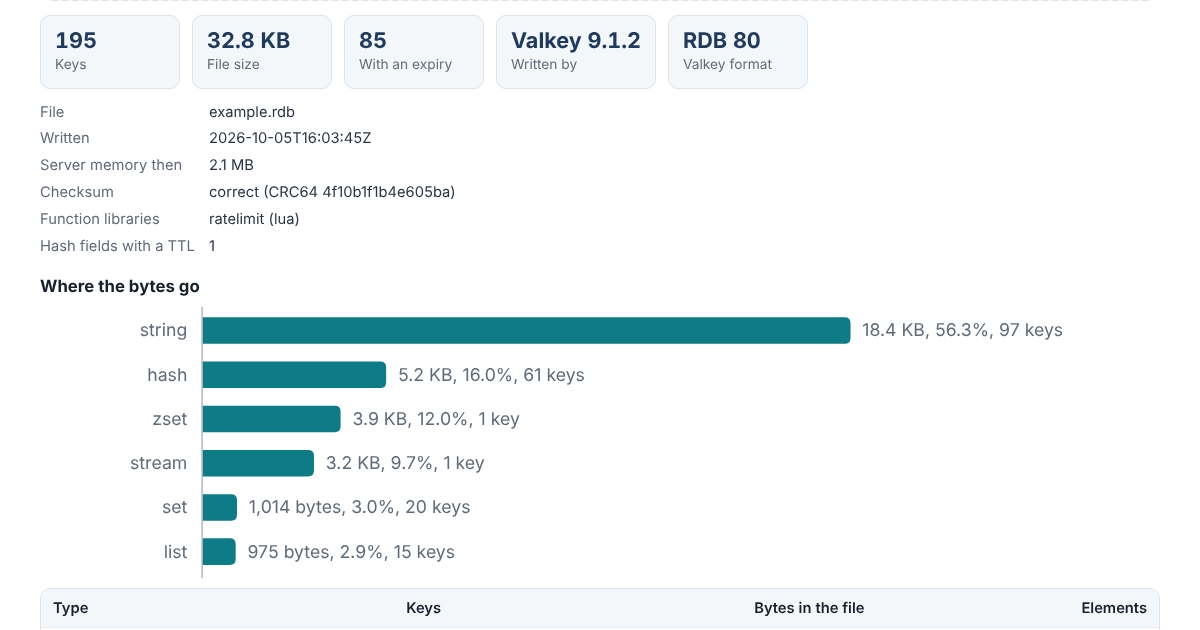
There’s a copy of the same data that answers those questions for free: the snapshot. The Snapshot Viewer opens a dump.rdb in your browser and shows the keys by type and database, the biggest keys, the prefixes that take the most space, how long expiring keys have left, and the value of any key you pick.
It runs in your browser and doesn’t send anything anywhere, and the page’s security policy stops it from fetching or loading anything from another site. For a file that holds a company’s data, that’s the point.
A Format That Split in Two
For years the RDB format moved in one line, version 6 in Redis 2.6 up to version 11 in Redis 7.2, which is also what Valkey 7.2 to 8.1 write. Then it forked. Redis 7.4 went to version 12, and Redis 8.10 writes version 15, with hash fields that expire on their own, arrays, hash templates that store field names once for many hashes, and streams that remember NACKed messages and idempotent producers. Valkey 9 jumped to version 80, starts its files with VALKEY instead of REDIS, and lays out its own hash field expiries differently.
Past type 21, the numbers no longer line up. Type 22, for example, is a hash with field expiries in both branches, but laid out differently, and Redis has types up to 33 that Valkey doesn’t have at all. So the viewer reads the header first and decodes each file in its own dialect. It handles every version from Redis 2.6 to 8.10 and Valkey 7.2 to 9.1, and it reads DUMP payloads, the single-key form of the same format, which the DUMP command returns and RESTORE takes.
What It Shows
Totals come first: keys, bytes in the file by type and by encoding, and which server version wrote the file and when. Encodings matter more than they look. A hash stored as a listpack is a compact block; past a size limit it becomes a hashtable and takes far more memory, and the snapshot says which one each key is.
The biggest keys and the busiest prefixes usually answer “what’s using the memory” on their own. Expiries show how many keys never expire and how much time the rest had left when the file was written. When the server runs an LRU or LFU memory policy, the file also records how long each key sat idle or how often it was used, and the viewer shows those too.
Every key can be opened, the way redis-cli would print it. The whole key list downloads as CSV, and the key names open in the Keyspace Map to find the naming patterns.
Checked Against Seven Servers
Seven servers built from source, Valkey 9.1.2 and Redis 8.10.2, 7.2.16, 6.2.24, 5.0.14, 3.2.13 and 2.8.24, loaded the same dataset and saved a snapshot. Then each was asked about every key through ordinary commands. For all 234 keys the viewer matched the server’s value, type, expiry and encoding, and every key’s DUMP payload decoded to the same value with a correct checksum.
The sizes turned up one small surprise. The bytes the viewer counts per value matched DEBUG OBJECT’s serializedlength on every server, apart from two cases in Redis 8.10.2: template hashes are reported at their DUMP size, field names included, and hashes with field expiries are reported 8 bytes short of what the file holds.
The viewer’s logic is one JavaScript file with no dependencies, open source under the Apache License 2.0. The command line reads files of any size piece by piece:
node snapshot/cli.js dump.rdb
node snapshot/cli.js dump.rdb --key session:9f86d081
The manual, the tests and the snapshots they replay are in the snapshot folder on GitHub.