Typed JSON Converter Turns DynamoDB JSON Into Plain JSON and Back Without Losing a Digit
Ask DynamoDB for an item and you get every value wrapped in its type: {"name": {"S": "Ana"}, "visits": {"N": "17"}}. It’s exact, and it’s a pain to read, to diff, or to hand to anything that expects normal JSON. Going the other way is worse, because writing typed JSON by hand for a test item or a quick fix is slow and easy to get wrong.
The Typed JSON Converter does both directions. Paste the output of aws dynamodb scan and get a clean list of items. Paste plain JSON and get typed JSON ready for put-item, or a set of batch-write-item requests, 25 items each. It works out the direction on its own, and it reads the shapes the AWS tools print: Scan and Query output, GetItem and BatchGetItem results, exports to S3 in DynamoDB JSON, and DynamoDB Streams records as a Lambda function receives them.
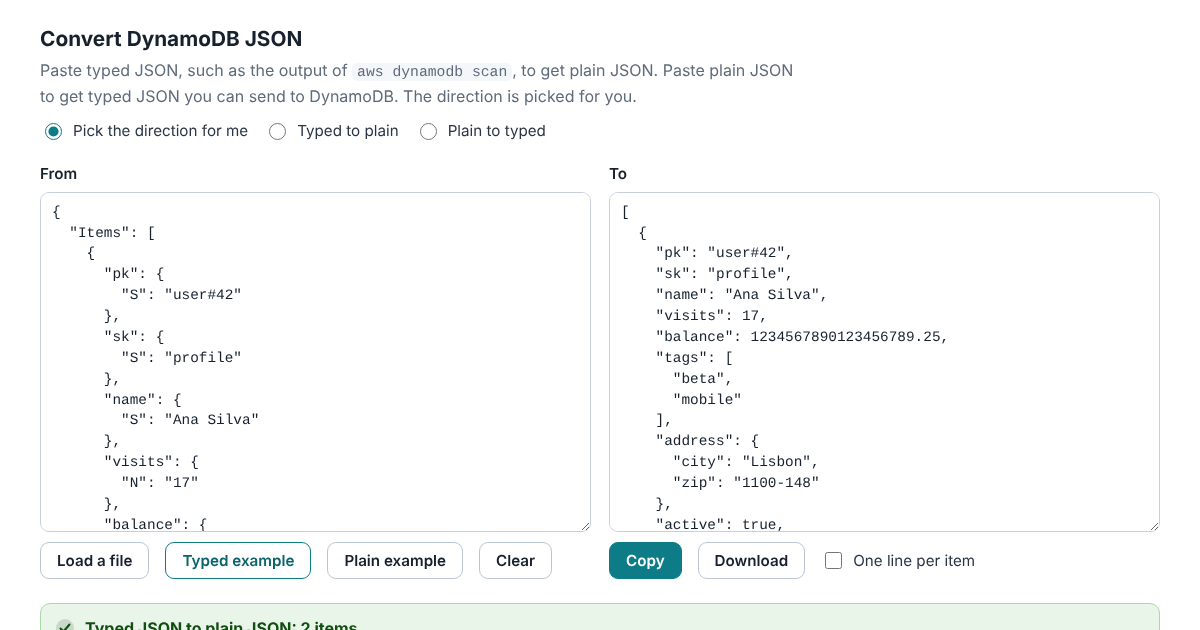
It runs in your browser and doesn’t send anything anywhere, and the page’s security policy stops it from fetching or loading anything from another site. Table data is often the last thing you want to paste into a stranger’s website.
The Number Problem
DynamoDB writes numbers as text, "N": "17", because it keeps up to 38 significant digits and most programming languages don’t. A JavaScript number holds about 15 to 17. Run JSON.parse on {"id": 12345678901234567890} and the ID comes back as 12345678901234567000. Most quick converters work exactly that way, so they quietly change large IDs and exact money amounts.
This one reads JSON with its own parser and keeps each number as the text it was written in. 12345678901234567890123456789012345678 goes in as typed JSON, comes out as that number in plain JSON, and goes back unchanged. Numbers DynamoDB accepts but JSON doesn’t, such as .5 or +5, come out as 0.5 and 5, the same values. A number with more than 38 significant digits gets flagged, since DynamoDB would refuse it.
Sets and Binary
Plain JSON has lists but no sets, so sets become lists when you convert to plain JSON. Going back, lists stay lists unless you ask for sets: then lists of unique strings become string sets and lists of unique numbers become number sets. A list with a repeated value stays a list, because DynamoDB refuses duplicates in a set, and the converter treats 1 and 1.0 as the same number, as DynamoDB does.
Binary values stay as their base64 text in plain JSON, which has no way to hold raw bytes. The converter says how many it found.
Checked Against the AWS SDK
The converter was checked against @aws-sdk/util-dynamodb 3.996.9, the library AWS publishes for this conversion. 3,000 random documents holding 10,963 numbers came out the same in both directions. Seven numbers at DynamoDB’s limits matched the SDK’s exact mode digit for digit, and 500 documents with sets matched the SDK’s sets.
The converter’s logic is one JavaScript file with no dependencies, open source under the Apache License 2.0. It also runs from the command line:
aws dynamodb scan --table-name users > scan.json
node typed-json/cli.js scan.json > users.json
node typed-json/cli.js --batch users users.json > batches.jsonl
The manual and the tests are in the typed-json folder on GitHub.