Expression Tester Checks DynamoDB Conditions, Filters and Updates the Way DynamoDB Does, Matched Against DynamoDB Local
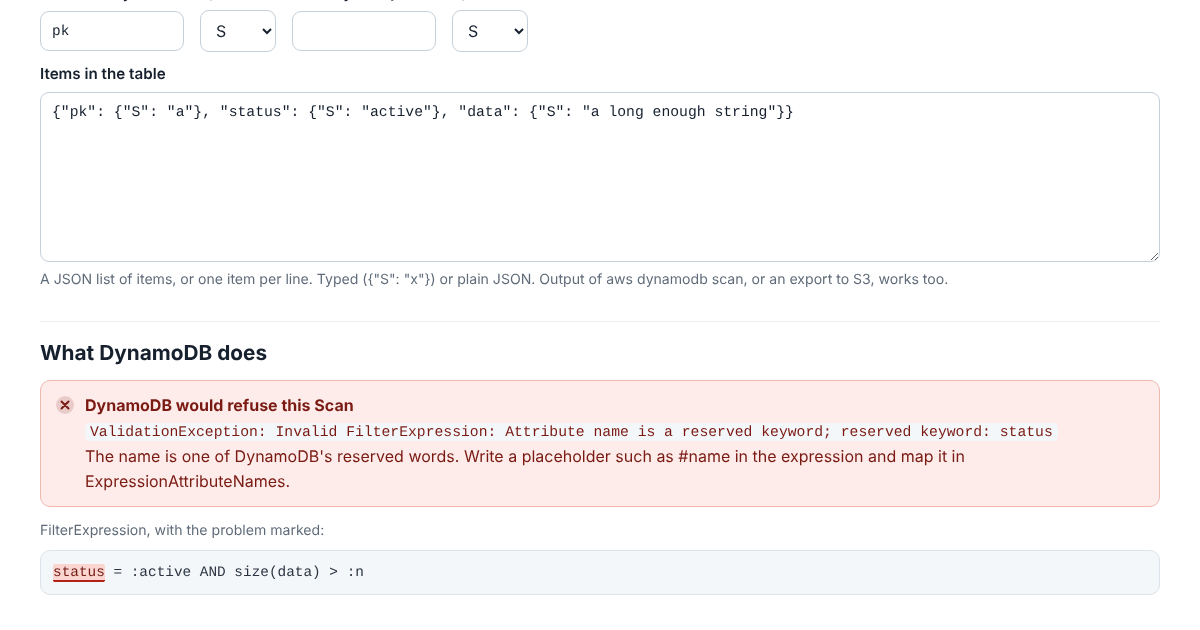
A DynamoDB filter like status = :active looks harmless and fails every time: status is one of 563 reserved words, and DynamoDB refuses the request with a ValidationException. So does a placeholder that’s defined and never used, two update paths that overlap, or a key condition with OR. The message names one problem at a time, and code usually finds them one by one, in a test run or in production.
The Expression Tester checks key conditions, filters, conditions, updates and projections the way DynamoDB checks them. It answers with the same message DynamoDB gives, word for word, finds the same problem first when there are several, and marks the spot in the expression. When the request is fine, it runs it on items you give it.
It runs in your browser and doesn’t send anything anywhere, and the page’s security policy stops it from fetching or loading anything from another site.
More Than Syntax
An accepted request still has room for surprises, and the tester shows them as it runs the request. AND binds tighter than OR, so a OR b AND c means a OR (b AND c); the tester draws the condition the way DynamoDB groups it. <> is true when the attribute is missing. Strings compare by their UTF-8 bytes, so "¿" sorts after "z". In an update every value comes from the item as it was, so SET a = b, b = a swaps two attributes, and REMOVE list[0], list[2] uses the positions from before the update. For a Query or Scan you see each item with the parts of the filter that held and the ones that didn’t. For an update, the item before and after.
Paste What Your Code Sends
The request can be the parameters your code passes to the SDK, with values typed the way the API writes them, {"N": "1"}, or plain, the way the document clients take them. Items can come from aws dynamodb scan or an export to S3. One button rewrites every reserved word in the expressions as a placeholder and adds the names to ExpressionAttributeNames, which fixes the most common error in one go.
Checked Against DynamoDB Local
AWS publishes a version of DynamoDB for development and testing, DynamoDB Local, and the tester was checked against version 3.3.1. A seeded generator wrote 4,800 requests, more than half of them broken on purpose. The tester gave DynamoDB Local’s answer to every scan, projection and query, the same message word for word or the same items in the same order, and to 1,472 of the 1,500 updates. The other 28 each had two or more problems that only show while the update runs, and DynamoDB Local named a different one first. Another 214 requests written by hand, each pinning down one rule, all matched.
One finding from the reserved words: AWS’s list has 573 of them, but DynamoDB refused 563. CONVERT and SIZE are accepted as names, and eight words such as AND and SET give a syntax error instead. Where the list and DynamoDB disagree, the tester does what DynamoDB does.
Try It
The tester is one JavaScript file with no dependencies, open source under the Apache License 2.0. A CI job can run it on every expression a codebase sends:
node expressions/cli.js --request request.json --items items.json --key pk:S,sk:N
node expressions/cli.js --escape 'status = :s AND size(data) > :n'
The manual, the tests and the requests they replay are in the expressions folder on GitHub.